We've generated thousands of playable ads on Hookin. The single biggest factor in output quality? The prompt. Not the AI model, not the rendering engine. The words you type in the box.
A vague prompt gives you a generic game. A specific prompt gives you something that looks like a studio built it. Same AI, same pipeline, wildly different results. The difference is usually about 50 words of clarity.
Here's everything we've learned about what makes a prompt work.
The Anatomy of a Good Prompt
Every good playable ad prompt answers five questions. Skip one and the AI has to guess. Sometimes it guesses well. Often it doesn't.
1. Game Mechanic
This is the single most important part of your prompt. Don't give the AI a genre label. Give it a specific mechanic.
- Weak: "A puzzle game"
- Strong: "A match-3 puzzle where players swap adjacent tiles to create rows of three or more matching icons"
Be explicit about the input type: tap, swipe, drag-and-drop, hold, or tilt. A "tap to collect" game generates completely different code than a "swipe to slice" game. Different event listeners, different physics, different feel. Not sure which mechanic fits your product? See our full catalog of game types.
2. Visual Style
Your visual cues determine whether the AI builds a 2D Canvas game or a 3D Three.js scene. (For the packaging and validation boundary, see where an AI-generated playable still needs a production workflow.)
- 2D cue: "Flat design, bright pastel colors, cartoon-style characters on a white background"
- 3D cue: "Low-poly 3D environment with neon lighting and a third-person camera following the character"
Mention color palette, art style (pixel art, flat design, isometric, low-poly), background type, and character style. The more visual information you give upfront, the fewer follow-up iterations you'll need. We've seen users go from three rounds of "make it more colorful" to getting it right on the first try, just by adding two sentences of visual description.
3. Interaction Pattern
This is the flow. How does the experience start? What does progression look like? When does it end? The best-performing playable ads run 15 to 30 seconds of active gameplay before the end card.
Spell out the details. Does the game have a tutorial hint? Does difficulty ramp up? Is there a timer, a score counter, or a level system? What triggers the end: time running out, hitting a score, completing a level, or losing? If you leave these blank, the AI fills in the gaps with defaults. Those defaults might be fine. They might also be the opposite of what you wanted.
4. Duration and Pacing
Playable ads are micro-experiences. Tell the AI exactly how long the game should last and how intensity changes.
"30-second gameplay. Starts slow with one falling object every 2 seconds. By the final 10 seconds, three objects fall simultaneously. Timer visible in the top-right corner."
Without duration cues, you'll get a game that's either too short to hook anyone or too long for ad network guidelines. Most networks expect 15 to 60 seconds of total interaction time, end card included.
5. End Card Behavior
The end card is where conversion happens. Don't leave it to chance.
"After the timer runs out, show an end card with the game logo centered, the player's score below it, and a green 'Download Now' CTA button. The background should blur the final game state."
Skipping end card instructions gives you a default layout. It works, but customizing it upfront saves you an entire iteration cycle. A DTC brand we worked with cut their average edit rounds in half just by adding end card specs to their initial prompt.
A useful prompt names the interaction, visual language, controls, runtime, and the moment that hands off to the store.
Too broad
“Make a fun playable ad for my game.”
Structured prompt
- Mechanic
- Drag three matching pieces into the target
- Style
- Bright 2D puzzle art that matches the game
- Input
- One-finger drag with clear success feedback
- Duration
- Reach the payoff within 20 seconds
- End card
- Show the game title and a clear Install action
Common Prompt Mistakes (and How to Fix Them)
We see the same five mistakes come up constantly. Here's each one and exactly how to fix it.
Too Vague
"Fun," "cool," "engaging," "exciting." These words mean absolutely nothing to an AI model. Zero visual information. Zero mechanical information.
- Problem: "Make a fun casual game with nice graphics"
- Fix: "A tap-to-pop bubble game with pastel pink and blue bubbles on a gradient sky background. Bubbles float upward and the player taps to pop them before they escape the screen."
Too Long and Contradictory
Prompts over 300 words almost always contradict themselves. You write "simple and minimal" in the first sentence, then ask for power-ups, combo multipliers, particle effects, and a leaderboard by the third paragraph. The AI tries to do all of it and the result is a mess. Keep it to 80 to 200 words. A playable ad is 30 seconds long. Two to three mechanics, maximum.
Ignoring Platform Constraints
Every ad network enforces a 5MB file size limit. When you ask for a realistic 3D city with traffic, pedestrians, dynamic lighting, and weather effects, you're asking for something that can't fit in that budget.
- Problem: "Realistic 3D city with traffic, pedestrians, dynamic lighting, and weather effects"
- Fix: "Low-poly 3D road with simple geometric obstacles. Single-color sky, no weather effects."
Missing the Interaction Model
This one burns people constantly. You describe what the game looks like but never say how the player interacts with it. The AI picks tap when you wanted swipe. Or drag when you wanted tap. Always state the input explicitly.
- Problem: "A game with fruits and a basket"
- Fix: "Fruits fall from the top of the screen. The player drags a basket left and right along the bottom to catch them. Missed fruits reduce a 3-heart life counter."
Forgetting the Ad Context
A playable ad is not a game. It's a 30-second conversion tool. Prompts that describe elaborate game systems without mentioning the CTA or end card produce games that feel complete. That's the worst outcome. You want the player to feel like they almost won, then show them where to get the real thing.
- Problem: "A complete tower defense game with 5 levels, upgradable towers, and enemy waves"
- Fix: "A single-wave tower defense where the player places 3 towers to defend against a stream of enemies. After 20 seconds, a bigger enemy appears that the player can't beat. End card says 'Unlock more towers in the full game.'"
Industry-Specific Prompt Examples
These are real prompts from our platform, cleaned up into templates. Copy them, swap in your details, and you'll have a solid starting point.
Gaming: Match-3 Puzzle
"A match-3 puzzle game where the player swaps adjacent gems to form rows of three or more. 6x6 grid, four gem colors (red, blue, green, yellow) with a glossy cartoon style. Matched gems pop with a small particle burst and new gems fall from above. 30-second timer in the top-right corner. Score counter in the top-left. After the timer expires, show an end card with the score and a 'Play More Levels' CTA button."
Gaming: Endless Runner
"A 3D endless runner with a low-poly character running forward automatically on a straight path. Player swipes left, right, or up to dodge obstacles (barriers and gaps). Speed increases every 10 seconds. Neon blue and purple color scheme on a dark background. Coin pickups along the path with a counter in the top-left. When the player hits an obstacle, show an end card with total coins collected and a 'Download Free' CTA."
Gaming: Merge Mechanic
"A merge game where the player drags identical items together on a 4x4 grid to create upgraded versions. Items are cute cartoon animals: two cats merge into a dog, two dogs into a panda, two pandas into a unicorn. Pastel background with soft drop shadows. Each merge triggers a sparkle animation. After the player creates the unicorn (or after 25 seconds), show an end card saying 'Discover all creatures!' with a CTA button."
E-Commerce: Product Showcase
E-commerce playable ads go well beyond gaming. For more ideas, see our guide on playable ads for e-commerce.
"A dress-up game where the player taps to cycle through outfit options on a character silhouette: 4 tops, 4 bottoms, 3 accessories. Clean white background, product items shown in a realistic flat style. Each clothing item slides in with a smooth animation. A 'total look' price displays at the bottom, updating with each selection. After choosing all three categories, show an end card with the styled character and a 'Shop This Look' CTA button."
E-Commerce: Discount Reveal
"A scratch-to-reveal game where the player swipes their finger across a golden scratch card to uncover a discount code underneath. Scratch particles fly off as the player swipes. When 70% of the card is scratched, auto-reveal the full code: '25OFF.' Confetti animation plays. End card shows the discount code large, a countdown timer saying 'Expires in 24 hours,' and a 'Shop Now' CTA."
Fintech: Investment Simulator
Fintech prompts need especially careful qualification: simulations must not imply guaranteed performance, real availability, or hidden financial outcomes. The playable-ad primer's fintech example shows the scope without turning it into a performance claim.
"A simple investment simulator where the player has a $1,000 virtual balance and taps to invest in one of three asset categories (stocks, crypto, real estate), each shown as a card with a simple icon. After choosing, a 10-second animated line chart shows the investment growing with realistic small fluctuations, ending at a positive return. The final balance displays in green. End card shows 'Start investing for real' with a CTA button. Clean, professional design: white background, dark text, blue accent color."
Food & Delivery
"Create a burger-building game where users stack ingredients (lettuce, tomato, patty, cheese) onto a bun by tapping the correct item as it slides across the screen. Timer counts down from 10 seconds. Each correct stack adds a point. After time runs out, show the completed burger with a 'Order Now' CTA and a '20% off your first order' message."
Health & Fitness
"Build a tap-to-run game where a character jogs through a park trail. Each tap adds steps to a step counter displayed at the top of the screen. Trees and benches scroll past in a flat-design style with green and sky-blue colors. After 15 seconds, show total steps with a 'Your first week is free. Start tracking' CTA button."
Dating
"Create a swipe-left/swipe-right card game with illustrated profile cards. Each card shows a cartoon portrait, a name, and a one-line bio. After 5 swipes, trigger a 'match found' animation with confetti and a pulsing heart icon. End card displays 'Find Your Match' CTA linking to app download on a gradient pink-to-purple background."
The Iterative Approach: Prompt, Review, Refine
Don't aim for perfection on the first generation. Aim for 80-90% right, then close the gap with chat.
Here's the workflow we recommend:
- Generate with a prompt that covers all five layers above
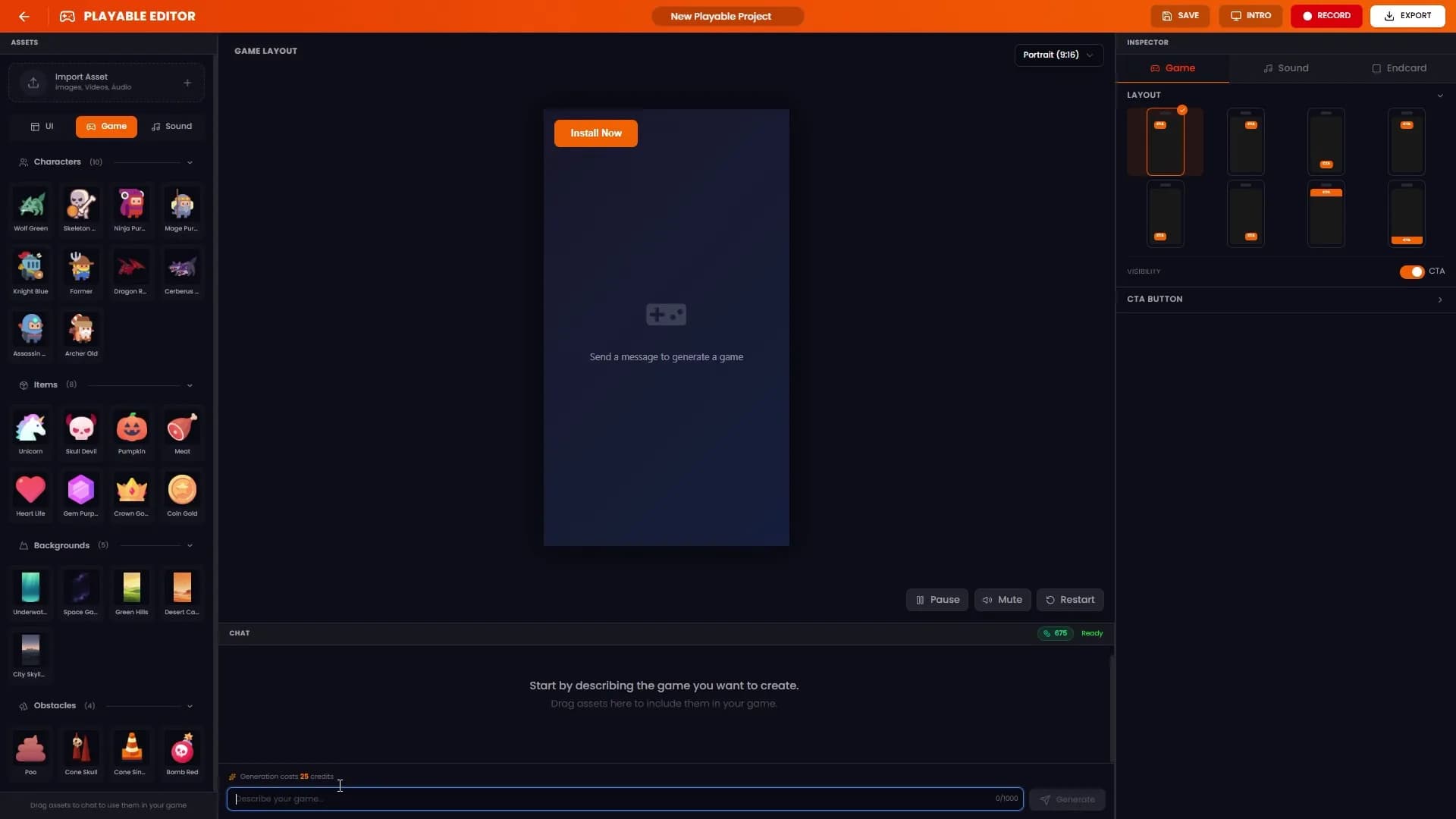
- Play-test in the preview panel. Check the mechanic, pacing, and end card
- Refine via chat with specific requests: "Speed up the falling objects by 30%," "Change the CTA text to 'Get Started Free'," "Make the background gradient darker"
- Adjust via inspector for CTA button style, end card layout, background music, and brand assets without triggering a full regeneration
- Export to any of our 10 supported networks: Google Ads, Meta, Unity, TikTok, AppLovin, ironSource, Mintegral, Vungle, AdMob, and Moloco
Two to three iterations total. One generation plus one or two chat refinements. That's typically under five minutes from idea to export-ready ad.
Start Writing Better Prompts Today
Define the mechanic. Describe the visuals. Specify the interaction flow. Set the duration. Design the end card. That's it. Five layers, 80 to 200 words, and you'll get a playable ad that actually converts instead of one you need to rebuild from scratch.
Put these prompt techniques to work. Create your first playable ad on Hookin.