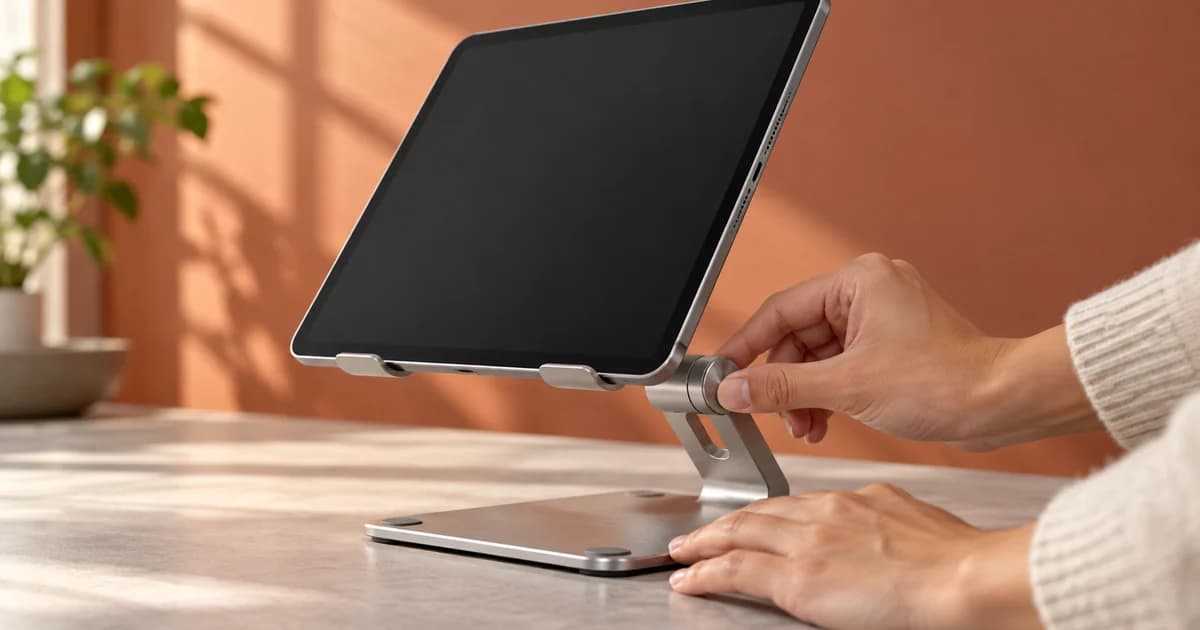
A tablet stand may have an “adjustable hinge,” but that feature is not yet a video. Skip the turntable spin and adjective. Keep the tablet in frame while a hand changes the angle, then hold on the new position long enough for the result to register.
That is the central job of Amazon Sponsored Products video: turn one product feature into one visible action with one observable result. Do not begin with a slogan, a brand film, or a compressed product-detail-page tour. Begin with the shopper’s unresolved question and film a credible answer without audio.
Amazon’s format is designed around modular product-feature videos for a single ASIN. An advertiser can add one to five videos inside a Sponsored Products ad group, while shoppers may see up to three contextually relevant feature thumbnails. Those clips can be surfaced according to signals such as the shopper’s query and browsing history, so every video must make sense on its own rather than depend on a fixed sequence. (Amazon Ads: complete Sponsored Products video guide)
Sponsored Products video is a product-proof format
Sponsored Products video is not a new upper-funnel campaign type. It is a video format added to a new or existing Sponsored Products campaign, using the ad group’s existing targeting and budget controls. A click leads to the advertised product’s detail page, and billing remains cost per click. (Amazon Ads: Sponsored Products overview)
As checked on September 9, 2026, Amazon’s official launch page and its Prime Day 2026 guide still identify Sponsored Products video as available in the United States only. Sellers and vendors can access it through the advertising console, and Amazon also lists API access. Availability can change, so advertisers outside the US should treat their own Ads Console as the final control rather than assume the broader country availability of ordinary Sponsored Products applies to this video format. (Amazon Ads launch announcement; Amazon Ads Prime Day 2026 guide)
| Decision | Sponsored Products video answer |
|---|---|
| What is being advertised? | One product, identified at ASIN level |
| What should the creative explain? | Specific features, functions, benefits, or usage |
| How many videos can be uploaded? | One to five feature videos per product in an ad group |
| What can the shopper see? | Up to three relevant feature thumbnails at one time |
| Where does a click go? | The advertised product detail page |
| How is it billed? | Cost per click |
| Current documented market | United States only, as checked September 9, 2026 |
The modular structure changes the brief. “Clip 2” might appear first because its feature better matches a query. No clip can open with “And it also…” or require an earlier scene; each needs its own subject, action, and proof.
Do not import the Sponsored Brands video playbook
The names are similar, but the creative systems are not interchangeable. Amazon positions Sponsored Brands video around discovery of a brand and its products. Its current guide supports horizontal and vertical video, can direct shoppers to a Brand Store or product detail page depending on the goal, and recommends devices such as a logo, call to action, and closed captions. (Amazon Ads: Sponsored Brands video guide)
Sponsored Products video is narrower. Amazon asks for product-feature demonstrations, no audio track, a horizontal 16:9 layout in the current specification, and no explicit branding or logos unless they are physically on the product. Its guide also rejects talking-head executions that need a script or caption to explain the feature. (Amazon Ads: complete Sponsored Products video guide)
| Creative choice | Sponsored Products video | Sponsored Brands video |
|---|---|---|
| Primary job | Explain a feature of one ASIN | Introduce a brand, product, or collection |
| Campaign structure | Added inside Sponsored Products | Built as a Sponsored Brands campaign |
| Clip structure | One to five modular feature videos | One video creative |
| Current orientation guidance | Horizontal 16:9 | Horizontal 16:9 or vertical 9:16 |
| Audio/text approach | No audio; feature must be understandable visually | Autoplays muted; closed captions recommended |
| Branding approach | Product first; no separate logo unless on product | Logo and CTA are recommended |
Do not simply cut a Sponsored Brands film into fragments or add its logo-and-CTA structure to these clips. Either move can displace the feature proof this format needs.
Convert a feature into action and observable result
Features usually arrive in a brief as nouns and adjectives: folding hinge, easy-clean coating, secure grip, water resistant, fast setup. Cameras need verbs.
Use this translation:
Feature → shopper question → visible action → observable result
“Folds flat” becomes: Will it pack away between uses? Remove the tablet, fold the support into the base, and slide the folded stand into the real sleeve shown in the final frame.
“Easy-clean surface” becomes: Will residue wipe away without a long scrub? Apply a representative mess, wipe in a continuous shot, and hold on the revealed surface. Do not hide the effort with a jump cut if the speed or ease of cleaning is the claim.
“Adjustable angle” becomes: Can I change the screen position during use? Keep the device seated while a hand changes the support angle, then release it and show that the tablet remains in the new position.
“Comfortable grip” is harder. A close-up can show grip geometry, finger placement, texture, or the absence of sharp-looking edges. It cannot objectively prove that every shopper will find the product comfortable. The video should demonstrate the physical basis of the claim and leave the subjective conclusion to the shopper.
Claims such as “waterproof,” “clinically proven,” “24-hour hydration,” or an exact load capacity demand extra care. The title, optional description, demonstration, advertised variation, and product detail page need to agree. Amazon’s filming brief explicitly tells creators to identify claim substantiation on the detail page before production. (Amazon Ads: how-to film guide PDF)
| Weak feature copy | Filmable brief | What the final frame must prove |
|---|---|---|
| “Game-changing setup” | Open the folded product, place the required item, and begin use in one continuous action | The product is open and ready for the shown use |
| “Ultimate portability” | Fold the product and place it inside the actual storage context | The folded product visibly fits there |
| “Powerful cleaning” | Show the product contacting a representative dirty surface, then reveal the result | The cleaned area is plainly visible |
| “Premium stability” | Apply a realistic interaction while keeping the full base and supported item in frame | The setup remains in position during that interaction |
| “Advanced controls” | Use the actual control to change an immediately visible output | The output changes in response to that control |
The final frame matters because it converts motion into evidence. If the clip ends while the hand is still covering the hinge, while foam still covers the cleaned surface, or before the product settles, the viewer has watched activity but not the outcome.
Choose the first three features by visual proof, not internal priority
Amazon allows one to five videos and recommends multiple clips so the ad can provide interactive feature navigation. Three is a practical starting set because it can fill the maximum number of thumbnails a shopper may see, without forcing a team to manufacture weak demonstrations merely to reach five. This is a production recommendation, not a guarantee that all three will be shown on every impression.
Score candidate features from zero to two on five questions:
- Shopper anxiety: Does the feature answer a real reason to hesitate?
- Visible action: Can the mechanism or use be filmed clearly?
- Observable result: Can a viewer verify an outcome in the frame?
- Standalone clarity: Will the clip work regardless of order?
- Claim safety: Can the title and demonstration stay within accurate, supported product claims?
For the fictional ArcFold folding tablet stand used in the downloadable examples, the shortlist looks like this:
| Candidate | Anxiety | Action | Result | Standalone | Claim safety | Total / 10 |
|---|---|---|---|---|---|---|
| Quick setup | 2 | 2 | 2 | 2 | 1 | 9 |
| Angle adjustment | 2 | 2 | 2 | 2 | 1 | 9 |
| Folds flat | 2 | 2 | 2 | 2 | 0 | 8 |
| Stable base | 2 | 1 | 1 | 2 | 0 | 6 |
| Premium material | 1 | 1 | 0 | 1 | 0 | 3 |
“Premium material” loses because a beauty shot can show finish but usually cannot prove “premium.” “Stable base” might become a good fourth clip after the team defines a representative, safe interaction and avoids implying an unsupported weight or impact rating. The top three already answer distinct questions: how use begins, how the screen position changes, and what happens after use.

A filled example: three short demonstrations for one product
The following clips are original rendered timing animatics, not footage of a real ASIN and not Amazon-approved ads. They make the shot logic concrete: each clip lasts eight seconds, contains no audio stream, uses a 1920 × 1080 horizontal canvas, and demonstrates one feature independently. A campaign producer should replace the rendered product and hand with accurate live footage of the advertised product.
| Clip | Upload copy | Shot sequence | Observable result |
|---|---|---|---|
| Quick Setup MP4 | Quick Setup — 11 characters; optional description: “Open, place, and use” — 20 characters | Begin with the folded stand. A hand opens it, then seats the tablet. | Tablet rests on the open stand, ready for the shown use. |
| Angle Adjust MP4 | Angle Adjust — 12 characters; optional description: “Tilt to your preferred view” — 27 characters | Start with the tablet already supported. A hand tilts the support while the product remains visible. | Tablet holds at a visibly different viewing angle. |
| Folds Flat MP4 | Folds Flat — 10 characters; optional description: “Packs into a slim sleeve” — 24 characters | Remove the tablet, fold the support into the base, and slide the product into the shown sleeve. | Folded stand visibly fits inside that sleeve. |

Notice what is absent: no logo opener, no list of specifications, no voiceover, and no final slide asking the shopper to “Buy now.” The title names the feature; the motion explains it; the last image confirms it. Because each clip starts from a recognizable product state, Amazon can reorder the feature set without breaking comprehension.
The examples also control claim risk: no unapproved setup time, universal pocket-fit promise, or exact angle range appears. Specific numbers belong only where the product and detail page support them.
Build a short proof loop, not a miniature commercial
Amazon sets a minimum duration of seven seconds and currently documents no maximum, while warning that a longer upload may be clipped according to placement, page, or shopper intent. (Amazon Ads: complete Sponsored Products video guide) For a feature that can genuinely be understood in one action, a seven-to-twelve-second working range keeps the clip focused. That range is an editorial production recommendation, not an Amazon maximum.
A reliable eight-second structure is:
| Time | Job | ArcFold example |
|---|---|---|
| 0.0–1.2 seconds | Establish the product and starting state | Folded stand is already large in frame |
| 1.2–5.5 seconds | Perform one continuous action | Hand opens stand and seats tablet |
| 5.5–8.0 seconds | Hold on the observable result | Hand exits; ready-to-use setup remains visible |
Open with evidence in motion whenever the starting state is already understandable. A slow push toward the packaging is not a hook for “Angle Adjust.” The angle changing is the hook. A macro shot of water beads may be attractive, but it does not establish waterproof protection unless the sequence shows the relevant exposure and result under accurate claim conditions.
Do not solve a weak visual with narration. Amazon says the exported file should have no audio track and that audio will be removed. A talking head whose meaning depends on speech or captions is specifically disallowed. If the feature cannot be understood after muting the edit, rewrite the shot rather than add more explanation.
Shoot for the placement
Amazon’s current creative guidance favors real products in real use, with the product occupying at least half the frame and, where appropriate, a person interacting with it. It recommends bright, consistent lighting, a clean or neutral setting, and stable capture; it warns against slideshows, blurry frames, letterboxing, excessive rendering, and on-screen captions. (Amazon Ads Creative Toolkit PDF)
Turn that policy into a practical shot-day standard:
- Frame the action tightly enough that the product remains the unmistakable subject, including during hand movement.
- Use a relevant environment, but remove props that compete with the demonstrated feature.
- Lock the camera for mechanism shots unless camera motion is necessary to reveal the result.
- Capture handles before and after the action so an editor can make clean, short versions without freezing a frame.
- Film each child ASIN or visible variation accurately; Amazon supports child-ASIN-level uploads so the video can match the advertised color or version.
- Review the image on a phone-sized display. Small controls, texture changes, and subtle before/after differences may disappear even when they look clear on an editing monitor.
Protect continuity in cleaning, assembly, pouring, fit, and transformation shots. A product that changes position or an object that suddenly fits after a cut can make a true feature look staged.
Use the current specification as a pre-export gate
Amazon’s guide currently lists the following Sponsored Products video requirements. Its table says vertical 9:16 is “to be available in 2026,” while Amazon’s filming PDF still says “no vertical yet.” Because a calendar-year roadmap is not proof of rollout, this article treats horizontal 16:9 as the verified current instruction and recommends checking the live upload interface before producing a vertical version.
| Field | Current documented requirement or guidance |
|---|---|
| Videos per product | 1–5 |
| Duration | At least 7 seconds; no documented maximum |
| Layout | Horizontal 16:9 currently documented |
| Recommended resolution | 1920 × 1080 pixels |
| File format | MP4 or MOV |
| File size | 500 MB or less |
| Audio | No audio; audio is removed |
| Product scale | Product should occupy 50% or more of frame |
| Required title | Up to 3 words and 15 characters |
| Optional description | Up to 6 words and 55 characters |
| Avoid | Blur, slideshows, letterboxing, captions, talking-head dependence, emojis, separate logos, excessive renders |
The downloadable animatics were exported as H.264 MP4 files at 1920 × 1080, eight seconds each, with no audio stream. Those technical checks make them valid teaching files, not campaign-ready product evidence: Amazon’s own guidance prioritizes live, accurate product use over excessive animation.
Write feature labels, not ad slogans
The title appears on an interactive thumbnail, so it should help the shopper choose what to inspect. Amazon limits it to three words and fifteen characters. The optional description allows up to six words and fifty-five characters. Both need to match what the clip actually shows.
Prefer concrete labels:
| Generic slogan | Better feature title | Why it is better |
|---|---|---|
| Game-Changing | Angle Adjust | Names the action shown |
| Ultimate Freedom | Cordless Use | Identifies the relevant feature, if accurate |
| Premium Design | Metal Body | Points to a visible construction detail, if substantiated |
| Next-Level Clean | Easy Rinse | Sets an inspectable expectation, if the clip shows it |
| Built for Life | Folds Flat | Directs the shopper to a specific demonstration |
A label can still be rejected if the proof is missing. A clip titled “Leakproof” that merely rotates a closed bottle does not demonstrate leak resistance. A clip titled “Easy Assembly” that begins after assembly has already happened skips the question the title promises to answer.
Upload, preview, and leave room for review
Amazon’s documented console path is: open the Sponsored Products campaign, choose the ad group, go to Ads, select the Video tab, and choose Add video. Upload the product’s videos, enter the required feature title and any optional description, then review the ad-group and ASIN mapping. (Amazon Ads: complete Sponsored Products video guide)
Amazon says a preview can become available within 48–72 hours after submission, and a resubmitted rejection may take another 24–48 hours for approval. It also notes that changes can take up to 48 hours to appear in preview. The filming guide and Creative Toolkit instead budget another 72 hours for a rejected video to be reviewed or activated; allow that longer interval when scheduling a resubmission. These are platform estimates, not guaranteed turnaround times. Build review time into the launch schedule rather than exporting on the morning a promotion begins.
Before submission, compare four things side by side:
- The exact child ASIN and visible product variation.
- The feature title and optional description.
- The action and result actually present in the clip.
- The corresponding claim and product information on the detail page.
This catches the most expensive class of errors: a well-shot demonstration attached to the wrong variation, or copy that promises more than the footage and page support.
Read performance as a creative diagnosis, not a verdict
Amazon’s Sponsored Products video report includes placement, impressions, clicks, click-through rate, view-through rate, orders, sales, return on ad spend, five-second views, and five-second view rate. Use those metrics with the campaign’s search-term, targeting, and retail context; a creative is not tested in isolation when bid, placement, price, reviews, inventory, and detail-page quality also shape the result.
| Pattern | Plausible diagnosis to investigate | Next creative check |
|---|---|---|
| Low five-second view rate | Opening state is slow, unclear, or visually small | Start closer to the feature action; enlarge product |
| Healthy views, weak clicks | Proof is understandable but not compelling for that query | Compare feature selection with search terms and shopper objections |
| Healthy clicks, weak orders | Video promise and detail page, variation, price, or offer may not align | Audit the landing ASIN and page evidence before changing the edit |
| One ad group outperforms another | Feature relevance may differ by targeting context | Keep the ASIN constant and test a feature set matched to that ad group |
| Good first clip, weak set engagement | Other thumbnails may be generic or redundant | Give each clip a distinct shopper question and outcome |
Amazon reports aggregate performance lifts for Sponsored Products campaigns with video in its own US internal data, but those figures are provider-reported comparisons, not a forecast for an individual ASIN and not proof that any one creative caused the difference. The actionable standard is simpler: does each clip help a shopper understand something important that the static listing did not make obvious?
Preflight checklist
- The advertised ASIN and visible product variation match.
- Each video covers one identifiable feature and can stand alone.
- The first seconds show the product and begin meaningful action.
- The final frame reveals the result without relying on narration.
- The product remains at least half the frame.
- Title and description fit the current word and character limits.
- Claims are accurate and supported by the product detail page where needed.
- Export is horizontal 16:9, at least seven seconds, MP4 or MOV, no more than 500 MB, and contains no audio track.
- There are no slideshows, black bars, embedded captions, unrelated logos, emojis, or voice-dependent talking heads.
- Files have been watched after export, not merely checked in the editing timeline.
A Sponsored Products feature video does not need to make the product look cinematic. It needs to make one purchase-relevant fact easy to see. Choose the shopper question, stage the action honestly, hold on the result, and let every clip earn its own feature label.
Sources
- Sponsored Products video: A complete guide to setting up effective product feature videos, Amazon Ads, accessed September 9, 2026.
- Show your products in action with Sponsored Products video, Amazon Ads launch announcement, November 11, 2025; accessed September 9, 2026.
- Prime Day 2026: Advanced advertising strategies, Amazon Ads, accessed September 9, 2026.
- Sponsored Products video Creative Toolkit, Amazon Ads PDF, accessed September 9, 2026.
- Sponsored Products video How-to Film Guide, Amazon Ads PDF, accessed September 9, 2026.
- How to get started with Sponsored Brands video ads, Amazon Ads, accessed September 9, 2026.
- Sponsored Products: Help increase product sales, Amazon Ads, accessed September 9, 2026.