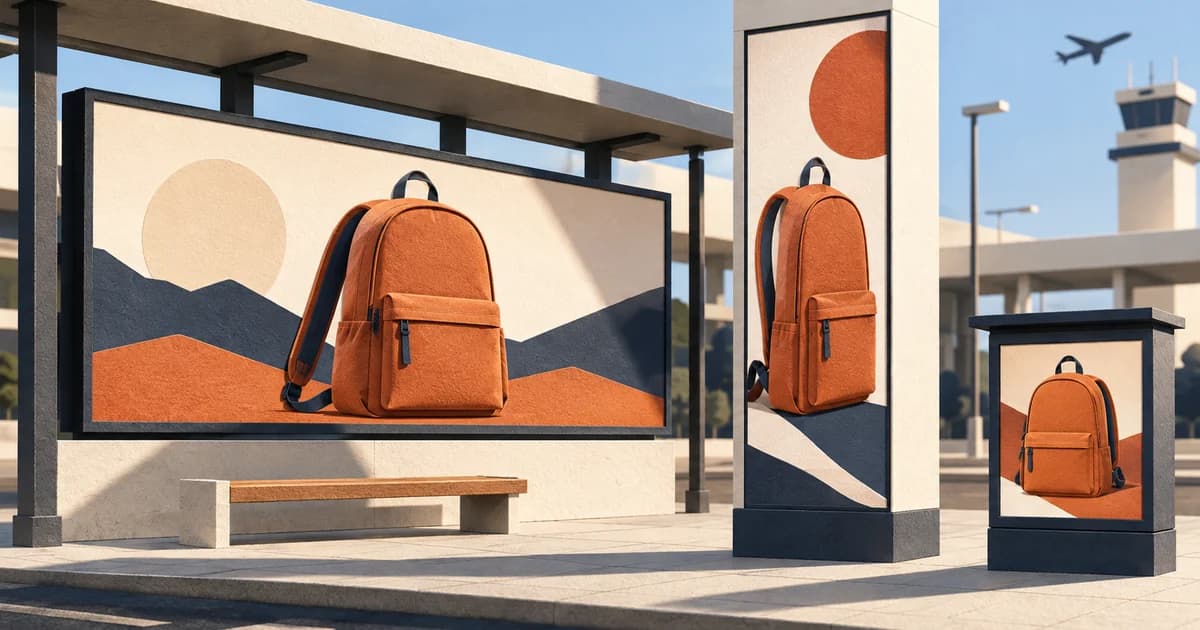
A media plan can describe all five placements as “digital out of home,” yet ask for five different creative products. A wide roadside board may need one static image. An airport portrait screen may require a ten-second, 25 fps video. An elevator network may require three companion canvases. A fuel-pump screen may accept a familiar 1920×1080 frame but add broadcast-style bitrate, frame-rate, audio, and delivery requirements.
The useful answer is not to build one universal DOOH file. Build one campaign system, then make a controlled delivery for each named owner, unit, buying route, and playback condition. The brand idea can stay consistent. The composition, sequence, file type, duration, sound, and submission path often cannot.
This article makes that distinction concrete with an original fictional campaign for the NORTHLINE Daypack. Its campaign thought is “ONE BAG. EVERY STOP.” The package includes finished teaching files for five screen types, a source-linked delivery matrix, and a reproducible asset generator. These are inspected production examples, not proof of acceptance by any media owner.

Start with a campaign system, not a master export
A source file is valuable when it separates what should remain fixed from what can move.
For NORTHLINE, the fixed parts are the product, brand name, orange–navy–cream palette, backpack illustration, and core promise. The variable parts are the crop, text position, number of beats, supporting copy, end-card duration, sound, and export settings. This gives the designer enough consistency to preserve recognition without forcing every placement to imitate the same rectangle.
That distinction prevents two common failures. The first is literal scaling: a landscape layout is squeezed into portrait until the product becomes small and the headline becomes a stack of awkward line breaks. The second is uncontrolled redesign: every adaptation introduces new copy, new colors, and new visual logic until the campaign no longer looks related.
Treat the campaign as a kit of parts with rules. Then treat each delivery as a separate contract.
The five-screen delivery matrix
The table below records the public source used for each teaching target and the file actually produced. It deliberately does not convert these examples into a universal DOOH standard.
| Screen type and public source | Published unit conditions used | NORTHLINE delivery in this package | What still controls a live campaign |
|---|---|---|---|
| Blip roadside teaching target | Blip accepts JPG or PNG, requires RGB, lists a 2 MB maximum, and says dimensions vary by board. Its common-size list includes 1840×526; the campaign dashboard provides the actual generic and exact sizes. Blip file requirements | HB92_demo_01_blip_roadside_1840x526.jpg; static RGB JPEG, 1840×526, 72 ppi metadata, under 2 MB |
The selected sign’s size in the Blip campaign dashboard and content review |
| JCDecaux UK Airport iVision | 1080×1920 portrait; ten seconds; static or motion at 25 fps; JPEG or MP4. JCDecaux says its new programmatic specifications apply from May 11, 2026. JCDecaux UK digital specifications | HB92_demo_02_jcdecaux_airport_ivision_1080x1920_10s_25fps.mp4; 10.00-second H.264 MP4 at 25 fps, no audio |
The booked site, buying route, copy instructions, and approval |
| Lamar NYC Urban Panel | 480×672; static or video; alcohol, political, and cannabis advertising restricted. Lamar programmatic media formats | HB92_demo_03_lamar_nyc_urban_panel_480x672.jpg; static JPEG |
The deal or owner sheet for any unlisted file-size, duration, codec, and trafficking details |
| Captivate Premium Full Screen, direct buy | A 15-second motion MP4 or static JPG/PNG is allowed; the elevator, large landscape, and large portrait sizes must all be supplied. The page depicts 640×480, 1024×680, and 720×960, asks for delivery five days before start, and says audio is not supported. Captivate creative ad specs | Three static JPEGs: 640x480, 1024x680, and 720x960 companions |
The direct-buy order, Captivate submission review, and any advanced-discussion requirement |
| GSTV fuel-pump video | 1920×1080 MP4; H.264; 29.97 fps; five- to 30-second duration; target 20 Mbps; maximum 100 MB; AAC audio guidance; ready-to-air files five business days before air. GSTV editorial guidelines | HB92_demo_05_gstv_fuel_pump_1920x1080_15s_29_97fps.mp4; nominal 15-second, 450-frame H.264 MP4 at 29.97 fps, about 20 Mbps, AAC stereo at 48 kHz |
GSTV’s final audio interpretation, editorial review, upload, and acceptance |
The downloadable five-screen delivery matrix carries the same comparison in a handoff-friendly form, including caveats and delivered filenames.
Adaptation 1: make the roadside file readable before making it decorative
The Blip example uses 1840×526 because that size appears in Blip’s current common-size table. It is a teaching target, not a claim that every Blip board uses those pixels. Blip says the selected signs determine the required dimensions and exposes generic and exact sizes in the campaign dashboard. It also allows only JPG or PNG, asks for RGB, caps the file at 2 MB, and treats 72 ppi as sufficient. The current upload guide explains all four constraints.
The creative response is compression of meaning, not just compression of bytes. The wide file carries four headline words, one product, and one brand block. It omits a QR code, disclaimer, feature list, and multi-step call to action. That is also consistent with Blip’s content and design guidance, which prohibits QR or text codes and fine print, limits copy to seven words, and requires artwork to match the target board’s pixel dimensions. Blip’s billboard design guidelines.
The product is pushed into the right third while the copy occupies a calm left field. This is a genuine re-composition: the backpack is not merely the same percentage size it had on a portrait master. The JPEG is RGB, tagged at 72 ppi, measures 1840×526, and is only about 63 KB. Those checks show that the teaching file matches the published upload conditions used here. They do not show that a real board has been selected or that the artwork has passed review.
Reader file: Blip roadside JPEG
Adaptation 2: use the airport portrait screen as a sequence
JCDecaux UK lists Airport iVision at 1080×1920, ten seconds, portrait, with static or 25 fps motion delivered as JPEG or MP4. Those values appear in the Digital 6-sheet specification table. That combination changes the creative opportunity. A tall screen does not have to behave like a poster with a tiny product in the middle; it can reveal the idea from top to bottom over time.
The NORTHLINE video uses four beats:
- 0.0–2.4 seconds: “GATE 12. TRAIN 3. DESK 9.” establishes a day made of stops.
- 2.4–4.8 seconds: the backpack appears with “ONE BAG.”
- 4.8–7.1 seconds: the palette changes and “EVERY STOP.” completes the thought.
- 7.1–10.0 seconds: the final product and brand lockup hold long enough to be read.
The copy remains the same campaign, but the airport version earns it through a short narrative. The wide roadside file cannot do that because it has to communicate in one glance. The airport file also stays silent; the concept does not depend on sound, and no sound requirement was assumed from the public iVision table.
The delivered MP4 was probed after export: 1080×1920, H.264, 25 fps, exactly 10.00 seconds, and no audio stream. Visual previews and the final frame were inspected. No upload or site playback test was performed.
Reader file: JCDecaux Airport iVision MP4
Adaptation 3: choose static deliberately for the urban panel
Lamar’s public page gives the NYC Urban Panel a specific 480×672 canvas and says the Bryant Park screens can use static or video creative. It also names category restrictions for alcohol, political, and cannabis ads. Lamar’s current format page provides those unit-level facts.
This example chooses static on purpose. The campaign already has a motion expression in the airport file; motion is not automatically the better use of every motion-capable screen. At 480 pixels wide, a restrained poster hierarchy keeps the brand strip, product silhouette, and four-word promise distinct. The product occupies the center, while the message sits on a high-contrast lower field rather than being squeezed beside it.
The public Lamar page does not state a file-size ceiling, video duration, codec, frame rate, or trafficking route for this urban-panel entry. The package therefore does not invent them. The JPEG is a usable teaching adaptation at the published dimensions, but a live delivery still needs the deal sheet or media-owner instructions. For programmatic work through Vistar, its May 20, 2026 guidance recommends JPEG for image assets and says the Vistar-provided specs or a media-owner Deal Summary Export should be treated as the source of truth. Vistar creative best practices.
Reader file: Lamar NYC Urban Panel JPEG
Adaptation 4: recognize when one “screen” is really a companion set
Captivate’s direct-buy Premium Full Screen specification is the clearest reason not to equate one placement with one file. Its page allows a static image or a 15-second MP4, but requires the elevator and both large-screen sizes. The page shows three canvases: 640×480 for elevator, 1024×680 for large landscape, and 720×960 for large portrait. It also says delivery is due five days before the start date and that audio is not supported. Captivate’s creative-spec page separates direct-buy and programmatic workflows.
The package therefore includes all three static companions:
The two landscape files use a side rail for the brand and a time cue, with the product and campaign thought in the larger field. The portrait file moves the brand to a top band, makes the backpack the central vertical object, and stacks the promise below it. Nothing important is cropped, but the layouts are not geometrically identical.
This is the difference between a resize batch and an adaptation system. A batch asks, “How can we fit the old art?” A system asks, “What hierarchy works in this canvas while preserving the same campaign memory?”
Adaptation 5: treat 1920×1080 as the start of the GSTV spec, not the end
A producer may see 1920×1080 and assume an existing social or CTV video is ready. GSTV’s page adds conditions that make that assumption unsafe: MP4, H.264, 29.97 fps, a five- to 30-second length, a target of 20 Mbps, a maximum of 100 MB, center-safe composition, and audio guidance. It also requests ready-to-air files five business days before air. GSTV’s current video-spec section lists those requirements.
The NORTHLINE spot uses the fuel-stop context without changing the product claim. “COFFEE.” and “KEYS.” establish quick departure rituals; “ONE BAG.” introduces the product; “EVERY STOP.” becomes the end card. The main copy and product remain near the center-safe area instead of relying on the outer edges. The file includes a simple stereo tone bed because GSTV says spots perform best with audio and full motion, but it makes no performance claim for this fictional example.
The export was probed as 1920×1080 H.264 at 30000/1001 fps, with 450 frames, AAC stereo at 48 kHz, a total duration of about 15.02 seconds, a video bitrate close to 20 Mbps, and a file size of about 35.6 MiB. At 29.97 fps, 450 frames represent the conventional nominal 15-second count; the container duration is not exactly 15.000 seconds.
One item remains a live-delivery confirmation. GSTV’s webpage literally labels its minimum audio value “48Hz/24-bit” and its preferred value “96kHz/24-bit.” Because the units are inconsistent and 48 Hz would not be a normal production sample rate, this package does not silently rewrite the operator’s page. The teaching file uses 48 kHz AAC stereo, but it should not be marked ready-to-air until GSTV confirms the intended minimum and whether its channel-layout instruction applies to the booked execution.
Reader file: GSTV fuel-pump MP4
Why aspect-ratio families help—but do not finish the job
Aspect-ratio families are useful production scaffolding. A team can organize source compositions around wide, landscape, portrait, and near-square families. JCDecaux UK says more than 80 of its formats can now be covered by seven aspect ratios, which shows the operational value of consolidation. It still publishes unit-specific lengths, motion rules, file types, and exceptions. JCDecaux’s page makes both points.
Programmatic platforms can consolidate delivery too. Vistar lists standard resolutions, supports automated resizing and letterboxing in some circumstances, and tells buyers to match the sizes passed in bid requests. It also says all creatives require media-owner approval and identifies the Deal Desk output or Deal Summary Export as the source of truth for campaign-specific specs. Vistar’s guidance was updated May 20, 2026.
That means a ratio family is a source-production convenience, not permission to ignore the booked unit. A 9:16 airport video and a 9:16 retail poster can still differ in duration, frame rate, audio, content restrictions, submission method, and viewing behavior. A platform’s ability to letterbox an asset is not evidence that letterboxing is the strongest creative choice.
Build the handoff in four layers
A reliable DOOH delivery sheet separates four kinds of information that are often mixed together in one “specs” column.
1. Canvas
Record the exact pixel dimensions, orientation, aspect ratio, file format, color mode, and any maximum file size. Do not substitute physical screen dimensions for the pixel canvas. Do not assume that a familiar ratio means a familiar resolution.
2. Playback
For motion, record spot length, frame rate, codec, bitrate guidance, audio codec and channel requirements, looping behavior, and whether a static end frame must hold. “MP4 accepted” is not a complete motion specification.
3. Environment and content
Record whether the audience is driving, walking, waiting, riding an elevator, or standing at a pump. Add safe areas, legibility constraints, QR rules, legal-copy rules, category restrictions, and any venue-specific content review. These conditions should change the creative hierarchy before export.
4. Trafficking and approval
Record the buying route, named media owner, unit or deal ID, submission destination, deadline, and approver. Direct and programmatic versions of the same network may follow different workflows. Captivate, for example, separates direct-buy and programmatic sections, while Vistar routes creatives through media-owner approval in its SSP. The final source of truth should be the current campaign-level sheet, not a screenshot inherited from an old project.
A practical filename can expose the most important fields without becoming unreadable:
BRAND_CAMPAIGN_OWNER_UNIT_WIDTHxHEIGHT_DURATION_FPS_AUDIO_VERSION.ext
For example:
NORTHLINE_DAYPACK_JCDECAUX_IVISION_1080x1920_10S_25FPS_NOAUDIO_V01.mp4
The package uses shorter reader-facing filenames, while the delivery CSV holds the remaining context.
A preflight that catches more than wrong dimensions
Run these checks before the file reaches the buyer or operator:
- Match the booking: owner, environment, unit, buy type, resolution, duration, and format all match the latest campaign-level instructions.
- Inspect the composition: no automatic crop, unintended bars, tiny legal copy, edge-dependent text, or product reduced beyond usefulness.
- Probe the file: verify pixel dimensions, duration, frame rate, codecs, audio streams, bitrate, color mode, and file size from the exported asset—not from the export preset name.
- Watch motion at normal speed: confirm the first readable frame, transitions, end-card hold, loop boundary, and that the idea survives muted playback where sound is optional.
- Review every companion: a three-size requirement means three inspected compositions, not one inspected master plus two unattended exports.
- Check content policy: QR, category, advertiser identity, disclaimer, and venue rules are part of creative specs even when the pixels are correct.
- Leave approval time: build backward from the operator’s submission deadline and allow time for rejection, correction, and re-export.
- Archive the evidence: save the source URL or deal export, access date, final filename, checksum, probe result, reviewer, and approval status together.
In this package, all seven final creative files were built and visually inspected. The two videos were behavior-checked for duration, dimensions, frame rate, codecs, and audio presence. The archive was checked after creation. None of the files was submitted to an operator, played on the named physical inventory, or approved for a live campaign.
The production rule to keep
“Make it DOOH” is not a complete brief. Neither is “send 1920×1080.” The working brief needs a named owner, named unit or deal, current source, canvas, playback contract, environment, delivery route, and approval deadline.
Preserve one campaign idea, but let each screen express it under its own conditions. That is how one campaign becomes a coherent set of deliverables instead of one compromised master copied into five folders.
Sources
- Your Guide to Billboard Design Requirements on Blip — Blip Billboards Help Center; current page checked September 9, 2026.
- Billboard Design Guidelines: Big, Bold, and Simple — Blip; current page checked September 9, 2026.
- Digital Technical Specifications — JCDecaux UK; page states new programmatic specifications apply from May 11, 2026; checked September 9, 2026.
- Programmatic DOOH Media Formats — Lamar Advertising; current page checked September 9, 2026.
- Creative Ad Specs — Captivate; current page checked September 9, 2026.
- Editorial Guidelines — GSTV; current page checked September 9, 2026.
- Creatives – Best Practices — Vistar Media; updated May 20, 2026; checked September 9, 2026.