
Set selected_product_id to tote01 and an ad shows a Canvas Tote, a tote illustration, a $20.00 price, and a tote landing page. Change that one field to bottle02 and all four elements change together.
That is the first thing a dynamic creative system must do well. It is not yet optimization.
The distinction matters because “DCO” is often used for several different mechanisms: filling a template from a feed, choosing a row with a rule, personalizing a message, assembling combinations, and learning which eligible option better serves a campaign objective. A browser control that swaps a product proves the mapping and rendering path. It does not prove that an ad platform delivered the creative, attributed an outcome, compared alternatives fairly, or improved performance.
This article separates those mechanisms, then makes the data-to-ad path inspectable through three fictional examples. You can also open the self-contained 40-state teaching demo and change the fields yourself. It uses synthetic Northstar Goods data, makes no network requests, and contains no live inventory, targeting, campaign delivery, or performance learning.
First, separate the mechanisms commonly bundled under DCO
Different products use different terminology, so it is safer to describe the mechanism than to force every system into one definition. Google Studio describes a dynamic creative as a creative shell whose content can come from manually entered profile fields or a feed, with rules deciding what content is shown. Amazon describes Responsive eCommerce Creative as selecting and optimizing product and asset combinations, while also applying inventory-aware behavior. These are related capabilities, not interchangeable implementation details. (Google Marketing Platform: About dynamic creatives; Amazon Ads: eCommerce display creatives)
| Mechanism | What changes the output | What it demonstrates | What it does not establish by itself |
|---|---|---|---|
| Feed-driven assembly | A selected record supplies title, image, price, URL, or other fields | The template can bind structured data to creative elements | Why that record was selected |
| Rule-based selection | An explicit condition makes one or more records eligible | The decision can be explained and replayed | That the rule improves the objective |
| Personalization | Known audience or context attributes alter eligibility or messaging | Different inputs can receive different outputs | Causal uplift, fairness, or privacy compliance |
| Multivariate creative | Several elements or variants can be combined | A larger candidate space can be rendered | That more combinations mean better creative |
| Optimization | Outcomes update how eligible options are allocated | Selection is influenced by measured performance against an objective | A universal lift or a transferable winning variant |
The practical test is simple: ask what changed the ad this time. Was it a feed lookup, a deterministic rule, a random draw, a fixed weight, or a model updated from prior outcomes? “Dynamic” answers the rendering question. “Optimization” must answer the allocation-and-feedback question too.
The six-step chain hidden behind one field
A reliable dynamic ad is not just field → pixel. It is a chain of decisions:
- Input: receive a product ID, stock state, context value, audience signal, or other data.
- Validation: check type, allowed values, formatting, required dependencies, and freshness.
- Eligibility: decide which records or variants are allowed to compete.
- Selection: choose one eligible record by a rule, randomization, weight, or model.
- Binding and render: map the selected record to text, image, price, CTA, and destination.
- Measurement and feedback: identify what rendered, attribute an outcome, compare candidates, and update future allocation.
Google Web Designer’s binding model makes the middle of this chain concrete: a binding connects a data-schema object, an element ID, and the element attribute that should change. Google’s HTML5 example separately binds a feed headline to text, an image URL to an image source, and a landing URL to the exit destination. Studio then treats filtering and rotation as separate profile decisions. (Google Web Designer: Dynamic data bindings; Google Marketing Platform: Build a dynamic creative using HTML5; Google Marketing Platform: Set feed filtering rules and rotation options)
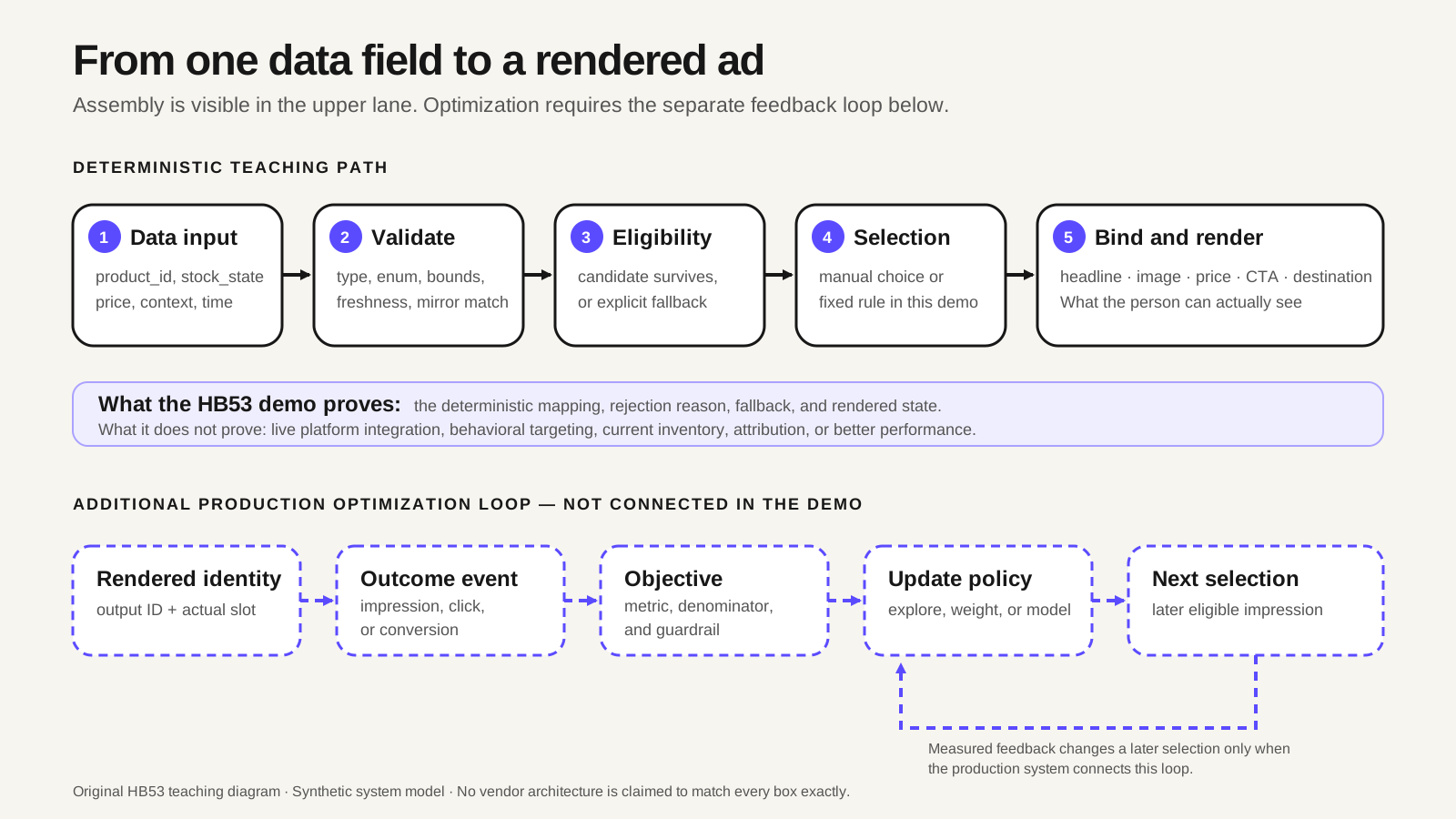
The three examples below make steps one through five visible. The sixth step stays visibly disconnected in the demo so a deterministic teaching artifact is not mistaken for a live DCO result.
Example 1: Change a product ID, not just a picture
The first fictional example uses a tiny catalog with three complete records:
selected_product_id |
Selected record | Bound headline | Bound image | Bound price | Destination |
|---|---|---|---|---|---|
tote01 |
Canvas Tote | Canvas Tote | tote-front |
$20.00 | /sample/tote01 |
bottle02 |
Steel Bottle | Steel Bottle | bottle-front |
$25.00 | /sample/bottle02 |
mug03 |
Mini Mug | Mini Mug | mug-front |
$18.00 | /sample/mug03 |
| missing or unknown | Generic fallback G0 |
Explore the sample catalog | neutral-catalog |
hidden | /sample/catalog |
Changing tote01 to bottle02 should not merely swap the illustration. It should select one coherent product record and atomically update the title, image, price, and destination. That mirrors how provider integrations expose product objects: Criteo’s retailer feed specification separates fields such as id, title, link, image_link, price, and availability, while its full API response example returns product identity, name, image, and price together. (Criteo: Product Feed Parameters; Criteo: API Responses)
The teaching contract adds stricter local rules that are deliberately not presented as platform limits:
price_centsmust be an integer from 1 to 999,999.- Currency must be
USD, formatted foren-USwith two decimals. - Titles may contain 1–40 Unicode code points.
- Images must use an allowlisted asset key rather than an arbitrary remote URL.
- Destinations must be known local sample routes.
- A separate landing-page mirror must agree on product ID, currency, and price.
Those constraints turn vague “feed hygiene” advice into testable behavior. For example, if the catalog says the tote costs $21.00 while the landing mirror says $20.00, the demo does not retain the new headline and image while hiding only the price. It falls back atomically to the generic catalog creative. That is a design choice, but it prevents a half-updated ad from combining a new product with an old price or destination.
Reader action: define a product record as a unit. List every element that must change together, then test missing ID, unknown ID, wrong type, unsupported currency, absent asset, overlong text, external destination, and landing-page mismatch before testing happy paths at scale.
Example 2: Let stock change eligibility, not just the badge
Availability is more than a line of copy. It can determine whether the product CTA is eligible at all.
The second example keeps product_id=tote01 fixed and changes only stock data:
| Input state | Freshness result | Badge | CTA and destination | Product CTA eligible? |
|---|---|---|---|---|
in_stock |
fresh | Available in this sample | View sample product → /sample/tote01 |
yes |
out_of_stock |
fresh | Unavailable in this sample | Browse sample catalog → /sample/catalog |
no |
unknown |
fresh | Availability not verified | Check sample details → product detail | no |
| missing or invalid | cannot verify | Availability not verified | Check sample details → product detail | no |
in_stock |
stale, future-dated, or timestamp missing | Availability not verified | Check sample details → product detail | no |
in_stock |
feed conflicts with landing mirror | Availability not verified | Check sample details → product detail | no |
The demo’s freshness boundary is explicit: age 3,600 seconds is accepted and 3,601 seconds is stale. That one-hour rule is only a synthetic contract, not a universal DCO service level.
Real products implement availability differently. Amazon says its Responsive eCommerce Creative skips out-of-stock items. In Criteo’s retailer integration, availability accepts preorder, out of stock, or in stock, and out-of-stock products are excluded from placements in that documented scope. Criteo also recommends at least daily catalog uploads and points retailers with constantly changing SKU data to its Product Importer API for closer-to-real-time updates. Those are provider-specific behaviors and recommendations, not proof that any particular ad reflects live stock at the moment a reader sees it. (Amazon Ads: eCommerce display creatives; Criteo: Product Feed Parameters; Criteo: Feed Best Practices)
This is why “in stock” should not be treated as timeless decorative text. A production design needs a source, a timestamp, a freshness policy, a known fallback, and—when the claim matters—a way to reconcile the ad with the landing experience. The safe response to stale or contradictory data may be to close the product CTA, remove the availability claim, route to a broader catalog, or suppress the creative. The right choice depends on the integration and business risk; the wrong choice is leaving the behavior implicit.
Reader action: write stock as an eligibility table before writing the badge copy. Include known out-of-stock, unknown, missing, invalid, stale, future-dated, and landing-mismatch paths.
Example 3: Choose a contextual offer with an explicit rule
Context can select an offer without pretending to be behavioral targeting or machine learning. In the third example, context is a manually selected synthetic value:
| Context input | Deterministic rule | Eligible offer | Output |
|---|---|---|---|
neutral |
no matching offer | generic G0 |
Explore the sample catalog |
rain |
rain → RAIN10 |
10% off Canvas Tote | $20.00 becomes $18.00 |
warm |
warm → WARM20 |
20% off Steel Bottle | $25.00 becomes $20.00 |
unknown, missing, or invalid |
validation/no-match path | generic G0 |
no offer claim |
The offer price is calculated in integer cents. For the warm case:
floor((2500 × (10000 − 2000) + 5000) / 10000) = 2000 cents
The rule is only the start. The selected offer must also be inside its half-open time window, its product must be fresh and in stock, and the independent landing offer mirror must match the calculated price. If WARM20 fails those gates, the demo does not quietly substitute the rain offer. It returns to the generic fallback and records the failure reason.
A provider example can make the same rule-based idea tangible without proving optimization. Hunch describes a weather playbook in which an ad starts at 15°C and adds one percentage point of discount for each degree above that threshold, reaching 20% at 35°C, with a Weather API checked hourly. The page documents the proposed rule, but not a complete error policy, discount cap, comparative campaign method, or measured result for that exact play. (Hunch: How to win using localized weather and time-based ads)
Reader action: give every contextual rule an ID, input contract, priority, validity window, dependencies, fallback, and reason code. That makes the decision replayable when someone asks why a specific offer appeared—or did not.
Missing, invalid, default, and no-match are different states
A generic “use a fallback” instruction hides the hard part: different systems assign different meanings to empty and invalid values.
Google Studio documents one sharp example. Under auto-filtering, a blank filter cell can make a row eligible for any impression. Under prioritized rules, a blank value is ineligible unless the profile allows rows with empty values. In the narrower prioritized-rules workflow, when no rule matches and several rows are marked as defaults, Studio says one of those defaults is selected randomly. A separate general default-content page says multiple default rows are selected according to the profile’s rotation settings. The safest reading is scoped: do not turn either statement into a universal default formula outside the workflow it describes. (Google Marketing Platform: Set feed filtering rules and rotation options; Google Marketing Platform: Prioritized rules; Google Marketing Platform: Set default content)
Criteo’s excluded_channels field shows another distinction: an empty or omitted field means no channel exclusion, while an unrecognized value causes the product to be excluded from all channels as a fail-safe in that integration. (Criteo: Product Feed Parameters)
Treat these as separate branches in your own contract:
| State | Meaning | Typical safe response |
|---|---|---|
| Missing | The field was not supplied | Apply a documented default or close the dependent claim |
| Empty | The field exists but carries no value | Follow the product’s explicit empty-value semantics |
| Invalid | Type, enum, format, or dependency is wrong | Reject the record or use a safe fallback; log the reason |
| Stale | The value was valid but is too old for the claim | Remove or downgrade the time-sensitive message |
| No match | Input is valid, but no rule applies | Use a declared default, suppress, or enter a defined rotation |
| Conflict | Two sources disagree | Avoid showing the disputed claim until reconciled |
A reason code such as missing_product_id, stale_stock_data, stock_excluded, or landing_offer_mismatch is more useful than a single “fallback used” flag. It explains whether the fix belongs in the feed, rule set, asset library, landing mirror, or delivery configuration.
What turns variation into optimization
Optimization begins when the system can learn from delivered alternatives, not when a template gains its second image.
A defensible optimization loop needs at least six things:
- An objective: CTR, CVR, revenue, qualified action, or another defined outcome.
- An eligible candidate set: only records that passed validation, policy, inventory, and scheduling gates.
- An allocation policy: random exploration, fixed weights, a bandit, a predictive model, or another documented method.
- Comparable exposure: enough information to distinguish a better option from a different audience, placement, time, or auction environment.
- Rendered-impression identity and attribution: evidence of what actually appeared and which outcome was assigned to it.
- A feedback cadence: a rule for when data updates future selection and how the system handles uncertainty or change.
Google Studio’s optimized rotation is a concrete product example. When more than one row is eligible, Studio says selection begins randomly; after sufficient performance data is available, better-performing content is served more often. Its documentation says CTR is used and CVR can also be factored when the creative is assigned to a Campaign Manager 360 ad optimized for conversions. It also warns that separate child feeds are optimized independently rather than optimizing the best cross-feed combination. (Google Marketing Platform: Dynamic rotation)
Research examples show why method and objective matter more than the word “AI.” A 2021 Alibaba-affiliated study of automated creative optimization used creative-element features and Thompson Sampling. Its online test ran for six consecutive non-holiday days, randomly and equally split traffic across algorithms, served more than 150,000 impressions per algorithm per day, covered more than 290,000 creatives, and updated models hourly. On one display placement, the paper reports roughly a 7% relative CTR increase over uniform allocation by day six. That is evidence about the tested system and placement—not a general DCO forecast. (Chen et al., “Automated Creative Optimization for E-Commerce Advertising,” WWW 2021)
A 2022 Yahoo study optimized for conversions in native advertising over a 28-day beta. The reported evaluation used a 90% treatment bucket and two 5% controls across selected advertisers, several dozen DCO ads, and more than one million impressions per day on average. The paper reports a 53.5% CVR lift against uniform selection and 38.0% against a CTR-based control, while CTR was 0.92% lower than the CTR control. The authors also note important limitations: only DCO ads with at least one conversion were included in the reported analysis, results were dominated by a few active ads, and some CPA or revenue differences were artifacts of shared ranking systems. The useful lesson is not the uplift number. It is that optimizing for conversions can select differently from optimizing for clicks, and that the comparison design determines what the result means. (Lev et al., “Conversion-Based Dynamic-Creative-Optimization in Native Advertising,” 2022)
The teaching demo deliberately stops before this loop. It can prove deterministic field substitution, validation, eligibility, rule selection, atomic binding, and reset behavior. It cannot prove delivery, attribution, exploration, model updating, or performance improvement.
Selected is not rendered, and rendered is not measured
Many DCO errors survive a preview because each boundary is tested separately.
Google’s dynamic-feed QA guidance notes that test IDs may work in Dynamic Preview but fail in live serving until they are replaced with real IDs and the feed is retransformed and republished. Its reporting setup always makes the feed’s unique ID and reporting label available and allows additional reporting dimensions, which can help connect a selected row to reported performance. That connection still does not prove that the intended pixels, destination, and offer appeared correctly. (Google Marketing Platform: Dynamic feeds QA checklist; Google Marketing Platform: Choose additional dimensions to include in reports)
Criteo’s retail-media documentation makes two more boundaries explicit. An API call can return HTTP 200 while the body reports an error, so transport success is not decision success. Its beacon guidance also distinguishes products returned by the API from products actually rendered: suppressed or non-rendered products should not be counted in the universal impression beacon, and painted-slot indices connect rendered positions to measurement. (Criteo: API Responses; Criteo: Beacon Types)
A useful decision record therefore keeps more than a variant name. At minimum, preserve:
- feed, schema, rule, and creative versions;
- the received input and validation result;
- eligible candidates and the selected record or rule;
- the final bound values, asset references, CTA, and destination;
- a rendered-impression or placement identity;
- the outcome event, attribution rule, and objective;
- the allocation policy and update time when learning is involved.
That record turns “the wrong ad showed” into a sequence you can inspect: wrong input, rejected record, unexpected eligibility, selection policy, binding error, render failure, destination mismatch, or measurement gap.
A practical DCO acceptance check
Before calling a system “optimized,” walk one example through these questions:
- Can you point to the exact input field that changed?
- Is its type, enum, formatting, freshness, and dependency contract explicit?
- Can you list the records that became eligible—and those that were excluded?
- Can you name the selection mechanism: rule, random, weighted, or learned?
- Do all dependent creative elements change as one coherent record?
- Does the landing experience agree on product, availability, currency, price, and offer window?
- Can you identify what actually rendered, not only what the API returned or preview selected?
- Is the campaign objective defined, and is there a fair comparison or control?
- Does an attributed outcome update future allocation? On what cadence?
- Can the system explain missing, invalid, stale, no-match, and conflict paths without inventing a live claim?
Changing one field is not a small trick. It is the most useful place to start because it exposes the contract between data and creative. Once that path is coherent, testable, and measurable, optimization can sit on top of it. Without that foundation, a larger feed or smarter model simply automates more ambiguity.
Sources
- “About dynamic creatives” — Google Marketing Platform, checked September 8, 2026.
- “Build a dynamic creative using HTML5” — Google Marketing Platform, checked September 8, 2026.
- “Set feed filtering rules and rotation options” — Google Marketing Platform, checked September 8, 2026.
- “Dynamic rotation” — Google Marketing Platform, checked September 8, 2026.
- “Prioritized rules” — Google Marketing Platform, checked September 8, 2026.
- “Set default content” — Google Marketing Platform, checked September 8, 2026.
- “Dynamic feeds QA checklist” — Google Marketing Platform, checked September 8, 2026.
- “Choose additional dimensions to include in reports” — Google Marketing Platform, checked September 8, 2026.
- “Dynamic data bindings” — Google Web Designer Help, checked September 8, 2026.
- “eCommerce display creatives” — Amazon Ads, checked September 8, 2026.
- “Product Feed Parameters” — Criteo Developer Portal, checked September 8, 2026.
- “Feed Best Practices” — Criteo Developer Portal, checked September 8, 2026.
- “API Responses” — Criteo Developer Portal, checked September 8, 2026.
- “Beacon Types” — Criteo Developer Portal, checked September 8, 2026.
- “How to win using localized weather and time-based ads” — Hunch, checked September 8, 2026.
- “Automated Creative Optimization for E-Commerce Advertising” — Chen et al., WWW 2021, published 2021.
- “Conversion-Based Dynamic-Creative-Optimization in Native Advertising” — Lev et al., arXiv v1 published November 13, 2022.