A 300×250 banner promotes 20% off desk kits with the code DEMO20. The product, discount, code, brand, and “Shop desk kits” CTA all fit in one clear composition. Should the underline slide in? Should the product rotate? Should the CTA pulse?
Probably not. None of those movements explains the offer. They add production work and another way for the message to be interrupted, but no useful information.
That is the central decision in the static-versus-animated banner debate: motion earns its place when it clarifies a relationship that a still image cannot show as efficiently. It might reveal an order, demonstrate a change, or guide the eye through a dense hierarchy. When it merely decorates a complete message—or withholds the brand, offer, or CTA until later—the static version is usually the better editorial choice.
This is not a claim that static banners always win on CTR. Public studies measure different things, under different conditions, and do not establish a universal format winner. The practical job is to choose the communication treatment, delivery route, and test that fit the message.
Choose the Message Before the File Type
“Static,” “GIF,” and “HTML5” are not three interchangeable creative ideas. Static describes a message that does not change over time. An animated GIF is a particular image format. HTML5 is a package that can carry either a static or animated treatment, with different loading, click, and fallback behavior.
Start with a one-sentence motion purpose:
Motion helps because it shows what changes, in what order, or what deserves attention next.
If the team cannot complete that sentence without saying “it looks more engaging,” design the static version first. It may already do the job.
For a fair comparison, keep the proposition, offer conditions, brand, CTA, core assets, dimensions, audience, placement, and destination as constant as the formats allow. Otherwise, you are testing two creative packages—not motion itself.
The following four 300×250 examples are original teaching treatments, not live ads or performance results. They show four different decisions. You can compare the four treatments in the motion demo and use the filled decision worksheet.
| Message job | Matched static treatment | Animated treatment | Editorial choice |
|---|---|---|---|
| Simple offer | “20% off desk kits.” Code DEMO20. Product, brand, condition, and “Shop desk kits” CTA visible together. | The same composition, plus an animated underline. | Use static. The motion adds no information or relationship. |
| Process explanation | “Your desk kit, in three steps” with Pick a kit → Choose a color → Review your order and “Build your kit.” | Keep all three steps and the CTA visible; move one highlight through the steps in order. | Motion is worth testing because sequence is the message. |
| Product change | Show the stand both open and folded with “Open for work. Fold for storage.” | Keep both endpoint labels visible while the hinge moves from open to folded. | Use motion only after the intermediate positions are physically accurate. |
| Information hierarchy | “A place for pens, notes, and cables” with all three labeled zones. | Keep all labels visible while one outline moves from zone to zone. | Use restrained motion only if it helps people locate the right zone; otherwise keep the static map. |
Notice what the useful animated versions do not do: they do not swap in a different offer, add a second benefit, postpone the CTA, or make the static version deliberately weak. Motion changes the explanation, not the proposition.

Design for the Interrupted Encounter
An animation has a timeline. A banner impression does not guarantee that a person starts at the beginning, watches to the end, or notices every state.
Google’s current Active View definition illustrates the gap between technical viewability and message completion: a standard display ad can count as viewable when at least 50% of its area is on screen for one second. That is not evidence that a four-second sequence played in full, was read, or was understood. See Google Ads’ Active View definition.
The process example makes the design consequence concrete. Here is a proposed 4.5-second timeline for two treatments with the same copy.
| Time | Persistent-information treatment | Serial-reveal treatment |
|---|---|---|
| 0.00 s | Headline, all three steps, brand, and CTA are visible. No step is emphasized. | Headline and brand only. No process step or CTA yet. |
| 0.75 s | “Pick a kit” is highlighted. Everything else remains readable. | First step remains visible. |
| 1.75 s | Highlight moves to “Choose a color.” | First step disappears; second step appears. No CTA. |
| 2.75 s | Highlight moves to “Review your order.” | Second step disappears; third step appears. No CTA. |
| 3.75 s | Highlight returns to a neutral state; full poster remains. | Full process and CTA finally appear. |
| 4.50 s | Same complete resting state. | Same complete resting state. |
The persistent treatment uses motion to explain order while preserving the whole proposition. The serial treatment uses time as a gate. Before 3.75 seconds, the CTA is unavailable; at several points, the viewer cannot reconstruct the full process from the visible state alone. That is a deterministic design observation, not an estimate of how many people would miss the message.
Run the same audit on every animated concept:
- Initial state: What is available before any meaningful movement finishes?
- Mid-sequence state: If someone notices the banner now, can they identify the brand, proposition, and action?
- Resting state: Does the final composition work as a complete ad after motion stops?
- Fallback state: What appears when the animated execution is unsupported or intentionally reduced?
Do not confuse the resting state with a server-side backup image. They are different assets with different jobs.
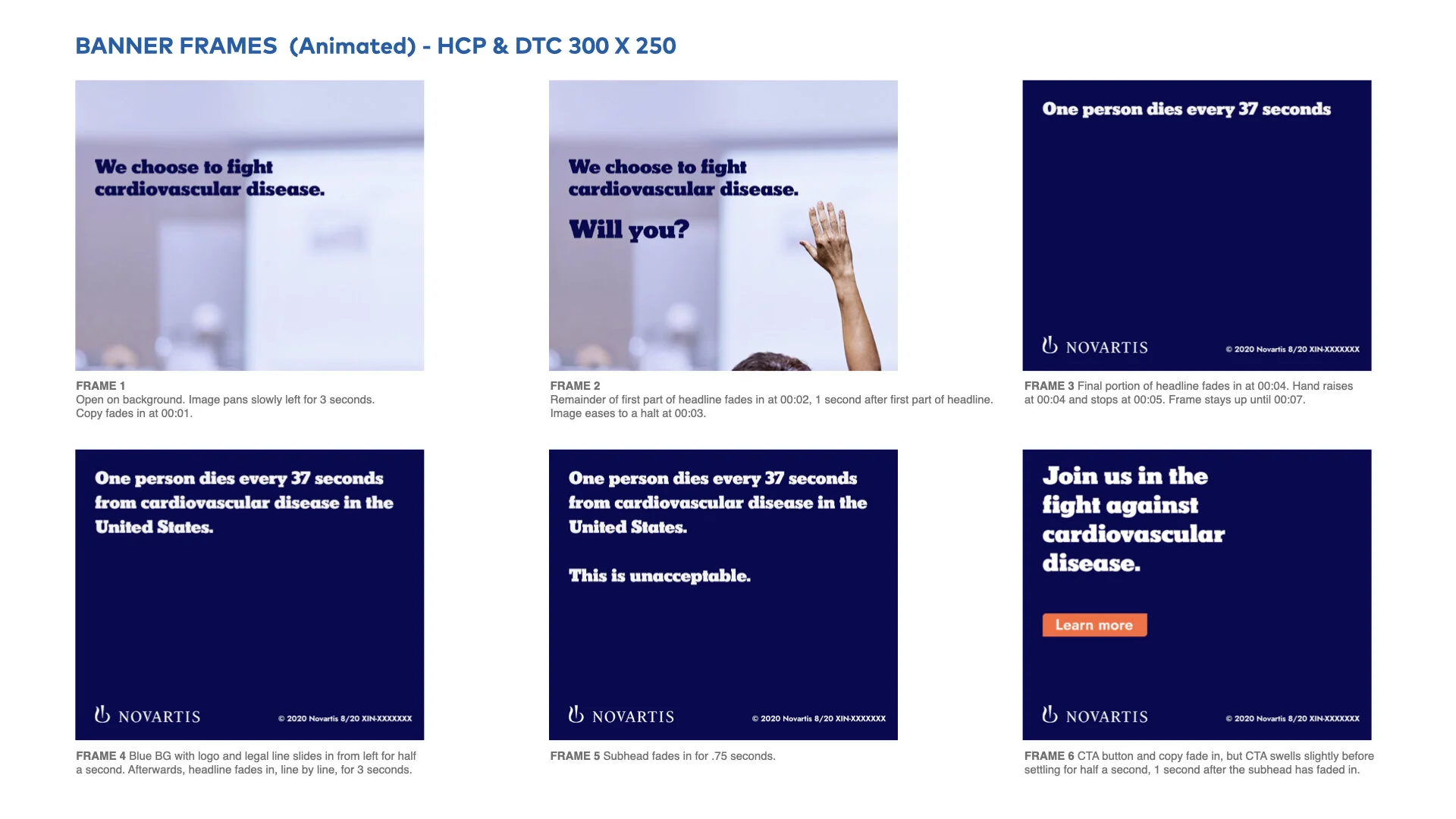
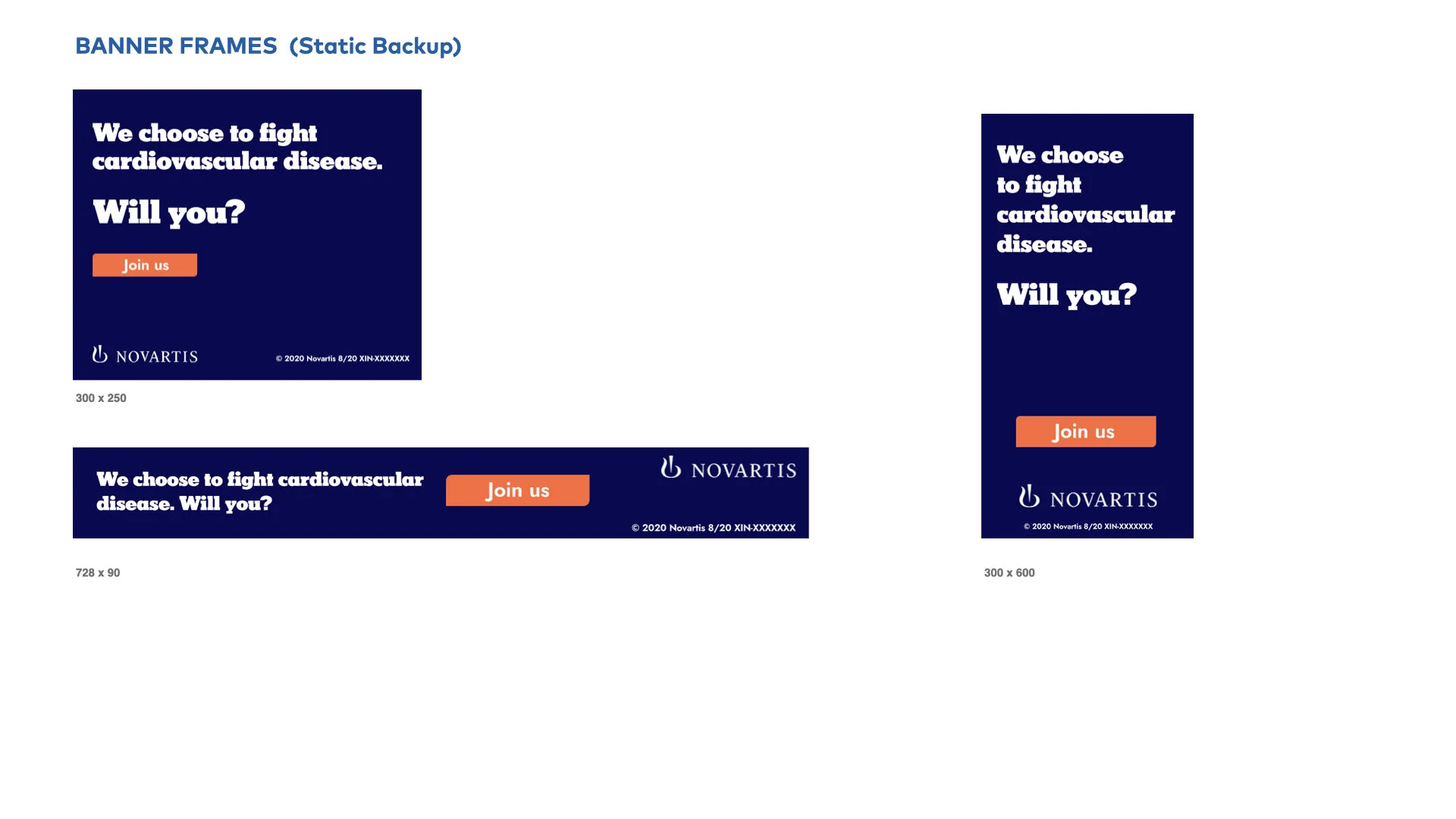
A published Novartis portfolio board shows why this distinction matters. Its 300×250 storyboard contains six numbered panels: the brand appears in the third panel and the CTA in the sixth. The separate “Static Backup” board presents a complete branded composition, but it also changes the imagery, copy, and CTA. The boards are useful evidence of a real design sequence, yet they do not disclose actual dwell times, looping, first render, delivery route, or performance—and the backup is not a controlled static counterpart. See Delphine Henault’s portfolio page, the six-panel 300×250 storyboard, and the static backup board.
The lesson is not “never reveal.” It is: do not make essential information depend on perfect attendance.
Treat GIF and HTML5 as Different Delivery Choices
A motion idea is not production-ready until it fits the exact buying route. The limits below were rechecked against first-party documentation on September 8, 2026; platform rules can change, and publisher or exchange requirements may be tighter.
| Product and route | Current first-party constraint | Practical consequence |
|---|---|---|
| Google Ads uploaded JPG, PNG, or GIF | Maximum 150 KB. For animated GIFs, total animation including loops must stop within 30 seconds, and the GIF must be slower than 5 FPS. Google Ads specifications | A GIF’s small file budget and frame-rate rule can force simpler movement, fewer frames, or more compression than the same concept in HTML5. |
| Google Ads uploaded HTML5 | ZIP up to 600 KB and no more than 40 files. Standard uploaded HTML5 cannot use multiple exits or modify clickability; after unsupported exit code is removed, the whole ad is clickable. Specifications and upload-error guidance | Do not copy a GIF export plan or a DV360 click implementation into this route. Confirm account eligibility before committing production. |
| Display & Video 360 uploaded HTML5 display | Animation may run for no more than 30 seconds. The browser may download up to 5 MB across creative files; the ZIP can contain up to 100 files, while publishers may require less. A readable click tag is required. DV360 HTML5 guidelines | “5 MB” is a served-download limit, not the same thing as Google Ads’ 600 KB ZIP limit. Exchange requirements still matter. |
| DV360 backup and polite-load images | A backup is uploaded separately from the HTML5 ZIP and serves when the creative is unsupported; without one, DV360 says a system-generated blank image is served. A polite-load image covers loading delay and is configured separately. DV360 HTML5 creative workflow | Design and QA the loading state, backup, and final resting state separately. One poster should not be assumed to perform all three functions. |
Google Ads also limits uploaded HTML5 access. Its help page currently lists a normal eligibility path of an account older than 90 days, more than $9,000 in lifetime spend, and good policy compliance; a separate application path may be approved with more than $1,000 in lifetime spend plus good payment and policy histories. Meeting the criteria does not guarantee access. That operational check belongs near the start of the brief, not at final export. See Requirements for using HTML5 ads.
Motion also has an accessibility cost. WCAG 2.2 Success Criterion 2.2.2 says automatically starting movement that lasts more than five seconds and appears alongside other content needs a way to pause, stop, or hide it unless the movement is essential. The accompanying explanation notes that continuous motion can distract some people and interfere with reading. See W3C’s explanation of Pause, Stop, Hide. W3C Technique C39 demonstrates the prefers-reduced-motion media query and, usefully, the inverse pattern: define a static state first and enable motion only when the user has not requested reduction. Its stated scope is interaction-triggered CSS motion, so it is a technique—not a blanket compliance certificate for autoplay banner ads. See Technique C39.
An HTML5 execution can respond to that preference when the serving environment permits it. A GIF cannot contain CSS logic of its own. Either way, the reduced or fallback state still needs the complete message.
Do Not Confuse Attention With Action
Research does not support a simple “animated gets more clicks” rule because studies differ in creative matching, task, exposure, format, and outcome.
| Study | What it compared and measured | Useful finding | What it does not establish |
|---|---|---|---|
| Burke et al., 2004 | 24 participants completed a visual-search task using 100 commercial animated banners and static versions made from representative frames. | Recognition was better for static versions; the static-versus-animated search-time difference was not significant. Paper | A static CTR advantage. The static frame may not preserve the entire animated message. |
| Yoo, Kim, and Stout, 2004 | 50 students saw matched 550×100 e-book banners in a controlled exposure; links were inactive. | Animation scored higher on self-reported attention, recall, ad attitude, and click intention; recognition did not differ significantly. Author-accessible text | Actual clicks, orders, or a result that generalizes beyond the tested brand and setup. |
| Li, Huang, and Bente, 2016 | 99 US participants browsed for three minutes while banners varied by ratio and animation speed; the study counted gaze contacts. | Fast animation produced more gaze contacts than static in the first 30 seconds, but animation did not significantly improve recall or attitude. Author copy | That more early contacts mean better understanding, CTR, or conversion. A gaze contact is not a fixation or a sale. |
| Hong, Cheung, and Thong, 2021 | Three eye-tracking experiments separated motion, looming, and lagging features across browsing and directed-search tasks. | The effect of animation features depended on the viewer’s task; results from browsing did not transfer cleanly to directed search. Author copy | A modern GIF-versus-HTML5 campaign winner. The stimuli were laboratory ads, and the study did not measure CTR or sales. |
A field setting does not automatically isolate motion either. A 2012 Norwegian study randomly allocated four banner variants across four sites, but its animated execution contained extra copy about beaches, surfing, and wine. The reported CTR comparison therefore changed message content as well as animation; one site also dominated the pooled result, and the disclosed impression table conflicts with the abstract’s exposure total. See Zorn et al., “Impact of Animation and Language on Banner Click-through Rates”. It is a useful warning about confounding, not a clean motion effect.
Vendor cases require the same discipline. Viewst’s Digicust page reports a CTR change from 0.14% to 0.8% and an 80% increase in leads after a broader creative-production change. It does not provide impression counts, assignment details, or a fully inspectable matched static/animated pair. There is also an arithmetic problem: using the rounded published rates, 0.8% is about 5.71 times 0.14%; the relative increase is approximately 471.4%, or 0.66 percentage points—not a 571% increase. See the Digicust case page.
Before repeating a result, name the actual measure: gaze contact, recall, recognition, self-reported intention, CTR, qualified lead, order, or contribution margin. Movement may affect one without improving the next.
Calculate What the Extra Work Must Earn
“Animation costs more” is too vague to guide a decision, and public production quotes are rarely comparable. Build the estimate from the same scope instead.
Here is a fictional internal-cost example for one concept, three sizes, one language and offer, supplied source assets, and one revision round. The rate and hours are assumptions—not market prices or a Hookin quote.
| Work item | Static hours | Animated hours |
|---|---|---|
| Brief preparation | 1.0 | 1.0 |
| Master layout | 3.0 | 3.0 |
| Storyboard | 0.0 | 1.0 |
| Animation | 0.0 | 3.0 |
| Two size adaptations | 1.5 | 2.5 |
| Export, fallback, and QA | 1.5 | 3.5 |
| Revision | 1.0 | 2.0 |
| Total | 8.0 | 16.0 |
At a hypothetical internal rate of $75 per hour, static costs $600 and animated costs $1,200. The incremental production cost is $600.
Now define an equally explicit direct-response scenario:
- 1,000,000 eligible impressions per treatment
- baseline static CTR of 0.10%
- 2% post-click order rate
- $50 contribution per order
- identical media cost, audience, placement, offer, and destination
The required incremental CTR is:
$600 ÷ (1,000,000 impressions × 2% order rate × $50 contribution) = 0.0006
That is 0.06 percentage points. The animated version would need to move from 0.10% to 0.16% CTR to cover the extra $600 under these assumptions—a 60% relative increase.
The full path makes the threshold easier to audit. At 0.10%, one million impressions produce 1,000 clicks, 20 orders, and $1,000 contribution. At 0.16%, they produce 1,600 clicks, 32 orders, and $1,600 contribution. The extra 12 orders contribute $600.
This is a break-even threshold, not a forecast. If eligible impressions or the post-click order rate were halved, the required CTR would rise to 0.22%, a 120% relative increase over the same baseline. If animation changes click quality, serving cost, media allocation, or conversion rate, the simple calculation must change too. For a comprehension objective, CTR may not be the primary outcome at all.
Test the Uncertainty That Could Change the Choice
A useful decision path ends with one of three labels: static recommended, motion hypothesis worth testing, or delivery blocked pending verification.
- Confirm the route. Record product, buying route, placement, dimensions, upload or served-load metric, click behavior, duration, fallback, and account eligibility. If the asset cannot be delivered as designed, the decision is blocked.
- Write the motion-purpose sentence. If motion does not explain sequence, change, or hierarchy, recommend static. Do not launch a field test to rescue an empty rationale.
- Run the state audit. Check initial, mid-sequence, resting, reduced-motion, loading, and fallback states. Proposition, conditions, brand, and CTA should not depend on a complete viewing unless that dependency is deliberate and tested.
- Choose the outcome that matches the job. For a process, test whether people identify the order correctly. For a product transition, validate physical accuracy and what people infer. For hierarchy, measure whether the intended item is found. For a direct-response offer, CTR or conversion may be appropriate—but only after the message is matched.
- Set the economic threshold. Replace the illustrative hours, rate, impressions, post-click rate, and margin with comparable inputs. Decide what improvement would justify the extra work before looking at results.
- Only then run a controlled campaign comparison. Keep message, audience, placement, size, date window, offer, destination, and measurement constant; document assignment and any platform optimization that changes exposure. Do not invent a sample-size rule without a baseline, minimum meaningful difference, and error tolerance.
The static-versus-animated question is therefore not “Which format is more engaging?” It is: Does motion make this particular message more complete, more accurate, or easier to follow—and can it do so in every state the audience may actually receive?
When the answer is yes, build the smallest motion system that proves it. When the answer is no, let the static banner do its job immediately.
Sources
- Uploaded display ads specifications. Google Ads Help. Accessed September 8, 2026.
- Fix error messages with Uploaded ads. Google Ads Help. Accessed September 8, 2026.
- Active View. Google Ads Help. Accessed September 8, 2026.
- Guidelines for HTML5 display creatives. Display & Video 360 Help. Accessed September 8, 2026.
- HTML5 creatives. Display & Video 360 Help. Accessed September 8, 2026.
- Understanding Success Criterion 2.2.2: Pause, Stop, Hide. W3C Web Accessibility Initiative. Accessed September 8, 2026.
- C39: Using the CSS
prefers-reduced-motionquery to prevent motion. W3C Web Accessibility Initiative. Updated January 12, 2026; accessed September 8, 2026. - Banner Ads Hinder Visual Search and Are Forgotten. Burke, Gorman, Nilsen, and Hornof; CHI 2004.
- Assessing the Effects of Animation in Online Banner Advertising. Yoo, Kim, and Stout; Journal of Interactive Advertising, 2004.
- The Impacts of Banner Format and Animation Speed on Banner Effectiveness: Evidence from Eye Movements. Li, Huang, and Bente; Computers in Human Behavior, 2016.
- The Impact of Animated Banner Ads on Online Consumers: A Feature-Level Analysis Using Eye Tracking. Hong, Cheung, and Thong; Journal of the Association for Information Systems, 2021.
- Impact of Animation and Language on Banner Click-through Rates. Zorn, Olaru, Veheim, Zhao, and Murphy; Journal of Electronic Commerce Research, 2012.
- How Digicust Boosted CTR by 571% and Increased Leads by 80%. Viewst. Accessed September 8, 2026.
- Banner Ads — Pharma. Delphine Henault portfolio. Accessed September 8, 2026.
- Novartis animated storyboard — 300×250. Delphine Henault portfolio; six-panel storyboard marked ©2020 / 8/20. Accessed September 8, 2026.
- Novartis static backup board — three sizes. Delphine Henault portfolio. Accessed September 8, 2026.